Security overview
Helpin protects workspace data through authentication, server-enforced authorization, scoped access, and configurable security controls. This guide explains the controls that workspace owners and admins should review.
Authentication
Members sign in to their Helpin account before accessing a workspace. Available authentication features can include passwords, passkeys, and two-factor authentication. The Members settings page shows each member's current 2FA status when that information is available.
Use unique accounts for each person. Do not share sign-in credentials.
Workspace roles
Every workspace member has one role:
Role | Security effect |
|---|---|
Viewer | Can read only the records and modules they are allowed to access. |
Member | Can create and change work allowed by their teams, modules, and feature permissions. |
Admin | Can manage workspace settings, members, access, and operations. |
Owner | Has full workspace access and owner-only controls. |
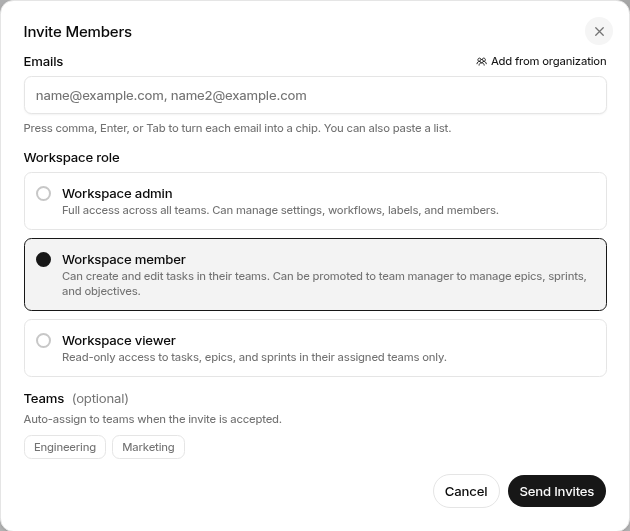
The standard invite flow offers Admin, Member, and Viewer. Ownership is managed separately. Give each person the lowest role that supports their responsibilities.
Teams and module access
Team membership limits access to team-scoped work and team-only Docs spaces. It can also grant CRM, Support, or Automation access to everyone in a team.
Projects and Docs are available to all workspace members. CRM, Support, and Automation require grants for members and viewers. Owners and admins always have every module.
These rules are enforced by backend authorization. Hiding a navigation item is not the security boundary.
Feature permissions
Opening a module does not automatically allow every action. Helpin checks feature permissions for operations such as editing work, managing settings, publishing public documentation, running agents, or changing billing.
Some actions are limited to admins, owners, billing managers, team managers, or people with a specific permission.
Agent safety and approvals
Agents use the same workspace authorization model as other product actions. A run receives an explicit target and a bounded set of tools. Approval can be required before a sensitive change is executed.
Approval adds review, but it does not grant missing permissions. A person or agent must still be authorized for the requested operation.
Review custom agents before enabling schedules or event triggers. Limit tools and targets to the agent's actual responsibility.
Documents and public content
Docs spaces can be internal or external-capable. Team-only spaces are visible only to selected teams. Public help center publication is a separate action from internal editing.
Before publishing, check the target space, document status, links, screenshots, and embedded artifacts. Remove private workspace data from public-facing content.
Integrations and credentials
Connected services can provide access to external data or execution. Limit who can manage integrations and review connections that are no longer needed.
Secrets and tokens should be stored through supported configuration, not pasted into documents, comments, task descriptions, or agent prompts.
Email authentication
When you send Support email from your own domain, publish the DNS records Helpin provides and wait for verification before relying on that sender. DKIM verifies outbound signing. Return-Path supports bounce processing. Use a DMARC policy appropriate for your domain.
Security checklist
Require individual accounts.
Encourage or require 2FA according to your policy.
Review owners and admins regularly.
Use team grants instead of direct grants when access should follow team membership.
Remove members who no longer need access.
Review integrations, agents, schedules, and public documents.
Keep self-hosted deployments, dependencies, and secrets maintained according to the operator documentation.
Was this article helpful?